Deploy
Pipeline
See also
Model Serving Basics
Background
Most of the attention paid to machine learning has been devoted to algorithm development. However, models are not created for the sake of their creation, they are created to be put into production. Usually when people talk about taking a model “to production,” they mean performing inference. A complete inference solution seeks to provide serving, monitoring, and updating functionality. This chapter will focus on the model serving, there are advantages about model serving as following,
Helping to standardize model serving across orgs with unified data plane and pre-built model servers
A single way to deploy, monitor inference services/server, and scale inference workload
Dramatically shortening time for data scientists to deploy models to production
Overview
Machine learning model inference is the process of taking an existing trained model and using new data as input to produce model output such as a classification (e.g., “label”), or a continuous real-valued number from a regression model (e.g., “house price”). The Figure1 shows the architecture of the model inference,
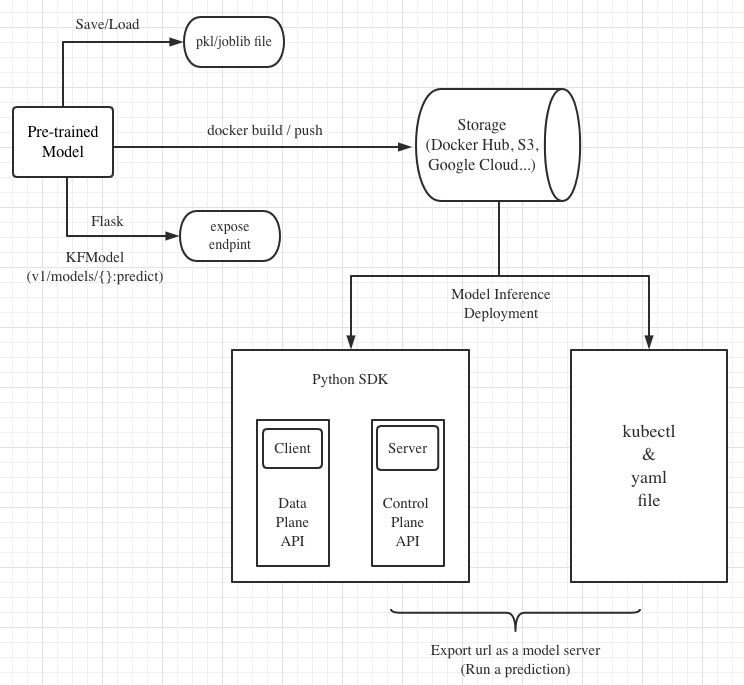
Figure 1 - The Workflow of Model Serving.
KServe Basics
Overview
KServe is a standard Model Inference Platform on Kubernetes, built for highly scalable use cases. KServe provides a Kubernetes Custom Resource Definition for serving machine learning (ML) models on arbitrary frameworks. It encapsulates the complexity of autoscaling, networking, health checking, and server configuration to bring cutting edge serving features like GPU Autoscaling, Scale to Zero, and Canary Rollouts to your ML deployments.
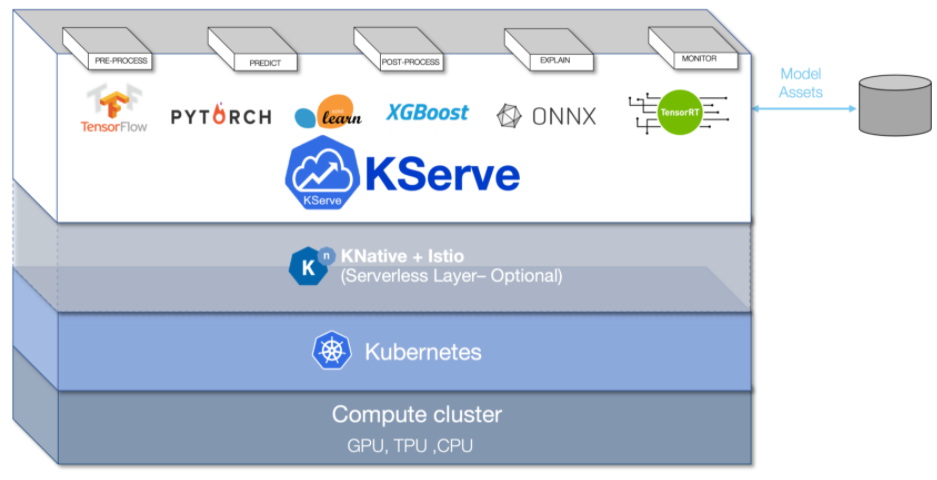
Figure 2 - The Overview of Kserve.
Architecture
Control Plane
Responsible for reconciling the InferenceService custom resources. It creates the Knative serverless deployment for predictor, transformer, explainer to enable autoscaling based on incoming request workload including scaling down to zero when no traffic is received.

Figure 3 - The Control Plane of Kserve.
Data Plane
The Kserve data plane architecture is described as figure 4.

Figure 4 - The Data Plane of Kserve.
Endpoint: InferenceServers are divided into two endpoints: “default” and “canary”. The endpoints allow users to safely make changes using the Pinned and Canary rollout strategies
Component: Each endpoint is composed of multiple components: “predictor”, “explainer”, and “transformer”. The only required component is the predictor, which is the core of the system
Predictor: The predictor is the workhorse of the InferenceService. It is simply a model and a model server that makes it available at a network endpoint
Explainer: The explainer enables an optional alternate data plane that provides model explanations in addition to predictions. KFServing provides out-of-the-box explainers like Alibi.
Transformer: The transformer enables users to define a pre and post processing step before the prediction and explanation workflows. KFServing provides out-of-the-box transformers like Feast
KServe’s Services and Features
Single Model Serving
Multi Model Serving
Deploy InferenceService with Transformers
Deploy InferenceService with Explainer
Deploy InferenceService with storage
Model Monitoring
Autoscaling
Request Batching
Payload Logging
Kafka
Using KServe
Environments
Cluster |
Kubeflow |
KFServing |
Demo Link |
|---|---|---|---|
AWS EKS with kubernetes 1.8 |
kubeflow 1.2 |
KFserving v0.4.1 |
|
OpenShift with kubernetes 1.8 |
kubeflow 1.4 |
KFserving v0.6.0 |
|
vSphere TKG with kubernetes 1.8 |
kubeflow 1.4 |
KFserving v0.6.0 |
Setup and Applications on vSphere TKG
Login vSphere TKG
1# login your vSphere TKG, 密码 Admin!23
2$ kubectl vsphere login --server=10.117.233.1 --vsphere-username administrator@vsphere.local --insecure-skip-tls-verify --tanzu-kubernetes-cluster-namespace=liuqi --tanzu-kubernetes-cluster-name=tkgs-cluster-31
3
4# export your vSphere TKG port, and login kubeflow ui with username (user@example.com) and password (12341234)
5$ kubectl port-forward svc/istio-ingressgateway -n istio-system 8080:80
Applications on vSphere TKG
Single Model InferenceService:
 1# Deploy a model inferenceservice [demo: <sert a link>]
 2kubectl apply -f sklearn.yaml -n kubeflow-user-example-com
 3# Output
 4$ inferenceservice.serving.kserve.io/sklearn-iris created
 5
 6# Run a prediction with curl
 7MODEL_NAME=sklearn-iris
 8INPUT_PATH=@./iris-input.json
 9SESSION=[login your kubeflow ui find the request header Cookie]
10SERVICE_HOSTNAME=$(kubectl get -n kfserving-samples inferenceservice ${MODEL_NAME} -o jsonpath='{.status.url}' | cut -d "/" -f 3)
11curl -v -H "Host: ${SERVICE_HOSTNAME}" -H "Cookie: authservice_session=${SESSION}" http://127.0.0.1:8080/v1/models/${MODEL_NAME}:predict -d ${INPUT_PATH}
12# Output
13*   Trying 127.0.0.1:8080...
14* TCP_NODELAY set
15* Connected to 127.0.0.1 (127.0.0.1) port 8080 (#0)
16> POST /v1/models/sklearn-iris:predict HTTP/1.1
17> Host: sklearn-iris.kubeflow-user-example-com.example.com
18> User-Agent: curl/7.67.0
19> Accept: */*
20> Cookie: authservice_session=MTYzNzc0NjkzOXxOd3dBTkVveU16Y3pXa0l6UkVKRVVGSkRWMVpSU2xveVIxQlZTRk0xUzBKWFFraEhNa2hFVkZaTVNGSlJURVJSVDA1TFJVcFFWVkU9fEFCFhhb2MHqcysV7xOCPIYkbgvA41mGoWRhb8e4waLa
21> Content-Length: 76
22> Content-Type: application/x-www-form-urlencoded
23>
24* upload completely sent off: 76 out of 76 bytes
25* Mark bundle as not supporting multiuse
26< HTTP/1.1 200 OK
27< content-length: 23
28< content-type: application/json; charset=UTF-8
29< date: Wed, 24 Nov 2021 17:29:14 GMT
30< server: istio-envoy
31< x-envoy-upstream-service-time: 30
32<
33* Connection #0 to host 127.0.0.1 left intact
34{"predictions": [1, 1]}
There are the supported ML frameworks and fuctions in KServe:
Model Name |
Verification |
Performance |
|---|---|---|
Sklearn |
Pass |
xxx |
Tensorflow |
Pass |
xxx |
PyTorch |
Pass |
xxx |
Paddle |
Pass |
xxx |
XGBoost |
Pass |
xxx |
LightGBM |
Pass |
xxx |
Rollout |
Pass |
xxx |
Transformer |
Not test |
xxx |
and so on |
… |
… |
Custom Model InferenceService:
 1# Run the training models on your local machine and server with kfserving.KFModel
 2#[demo: insert a link]
 3# Build a model server with docker
 4docker build -t {username}/kfserving-custom-model ./model-server
 5# Push the container to docker registry
 6docker push {username}/kfserving-custom-model
 7
 8# Create the InferenceService with yaml file
 9kubectl apply -f custom.yaml
10# Output
11$ inferenceservice.serving.kserve.io/sklearn-iris created
12# Run a prediction
Using KServe Python SDK: XXX
Deploy InferenceService with Cloud/PVC storage: XXX
Setup and Applications on OpenShift
XXX
Advanced KServe
Kserve Python SDK
Overview
Python SDK for KFServing Server and Client
1# Installation
2pip install kfserving
3
4# Install via Setuptools
5sudo python setup.py install    # for all user
6or
7python setup.py install --user
KFServing Server
KFServing’s python server libraries implement a standardized KFServing library that is extended by model serving frameworks such as Scikit Learn, XGBoost and PyTorch. It encapsulates data plane API definitions and storage retrieval for models
KFServing Client
KFServing’s python client interacts with KFServing control plane APIs for executing operations on a remote KFServing cluster, such as creating, patching and deleting of a InferenceService instance
API Groups:
KnativeAddressable
KnativeCondition
KnativeURL
V1beta1Batcher
V1beta1ComponentExtensionSpec
V1beta1CustomExplainer
V1beta1InferenceService
V1beta1InferenceServiceList
and etc…